
Restaurant Menu QR Code: Complete Setup Guide for 2025
Learn how to create a QR code menu for your restaurant. Reduce printing costs, update instantly, and provide a touchless dining experience.
QR code menus have transformed from a pandemic necessity to a permanent fixture in modern hospitality. They offer restaurants flexibility, cost savings, and valuable customer insights. Here's everything you need to know about implementing QR code menus effectively.
Why Use QR Code Menus?
Instant Updates
Run out of a dish? Price change? New seasonal special? Update your digital menu instantly without reprinting. Dynamic QR codes mean the same printed code always shows your current menu.
Cost Savings
Traditional menu printing is expensive, especially for restaurants that change offerings frequently. Digital menus eliminate reprinting costs entirely.
Hygiene Benefits
No more handling menus touched by dozens of customers. QR codes provide a touchless experience that many diners now prefer.
Multilingual Options
Link to a menu page that offers multiple languages. Serve international tourists without printing separate menus for each language.
Analytics and Insights
Track when customers scan, which items they view most, and peak browsing times. Use this data to optimise your offerings.
Types of Digital Menus for QR Codes
PDF Menu
The simplest option—upload your existing menu as a PDF and link to it. Quick to implement but limited in interactivity.
Pros: Easy, uses existing design, works offline once loaded
Cons: Not mobile-optimised, hard to update, no analytics
Website Menu Page
A dedicated page on your restaurant website with your menu. Mobile-responsive and easy to update.
Pros: Mobile-friendly, easy updates, integrates with website
Cons: Requires website maintenance, basic functionality
Dedicated Menu Platform
Services like Square, Toast, or dedicated menu apps offer rich features including photos, descriptions, allergen info, and ordering capabilities.
Pros: Feature-rich, professional appearance, often includes ordering
Cons: Monthly fees, dependency on third-party service
Custom Web App
A bespoke solution built specifically for your restaurant. Maximum flexibility and branding control.
Pros: Fully customised, unique features, complete brand control
Cons: Higher development cost, requires technical maintenance
Step-by-Step: Setting Up Your QR Code Menu
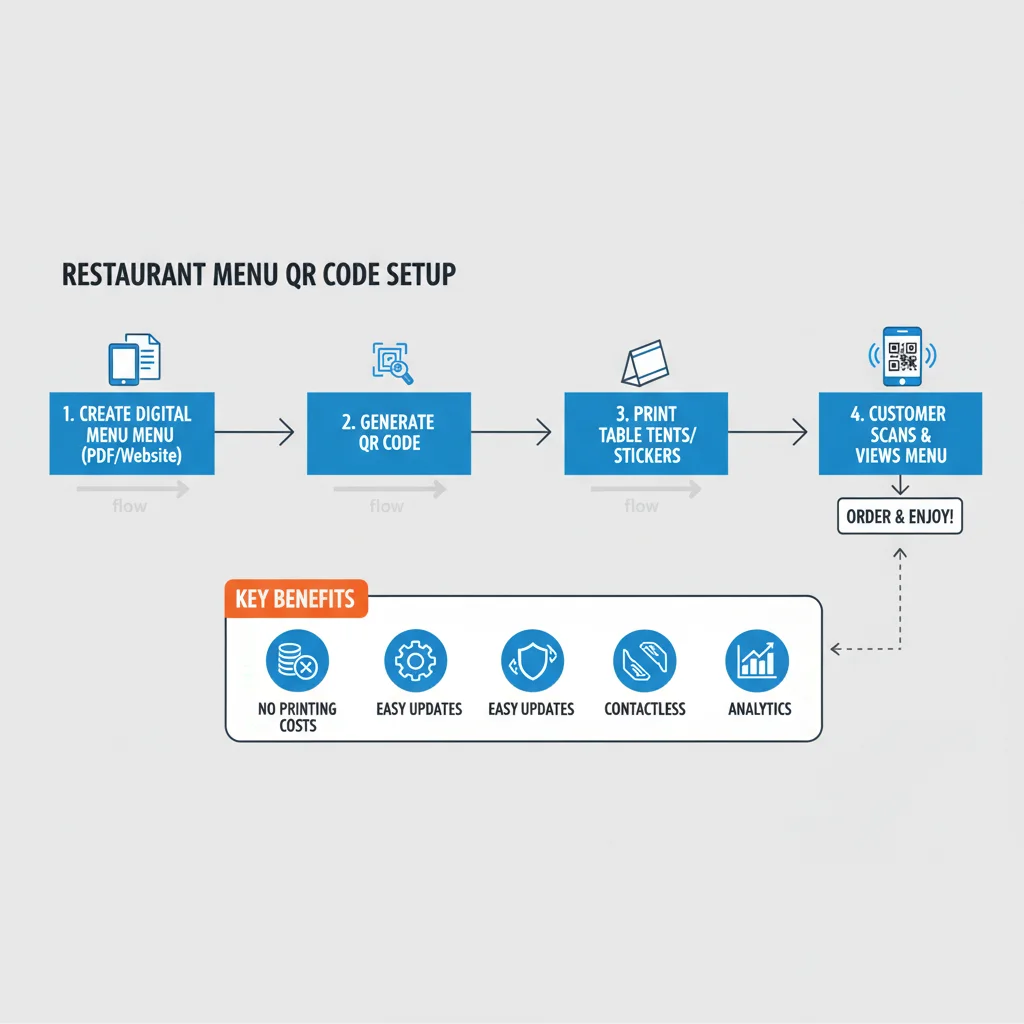
Step 1: Prepare Your Digital Menu
Before generating a QR code, you need somewhere to point it:
- Audit your current menu: Update prices, remove discontinued items, add new offerings
- Add photos: High-quality images increase orders by up to 30%
- Include allergen information: Mark items containing common allergens
- Write compelling descriptions: Describe dishes enticingly but accurately
- Organise logically: Group by course, type, or dining occasion
Step 2: Choose Your Menu Hosting Solution
For most restaurants, we recommend:
- Small cafes/bistros: Website page or simple PDF
- Mid-size restaurants: Dedicated menu platform (Square, Toast)
- Large or multi-location: Custom solution or enterprise platform
Step 3: Generate Your QR Code
Use a dynamic QR code generator so you can update the destination URL without reprinting. Enter your menu URL and customise the design to match your branding.
Critical: Use a dynamic QR code. When your menu URL changes or you switch platforms, you can update the redirect without replacing table tents.
Step 4: Design Table Displays
Your QR code needs an attractive, durable display:
- Table tents: Freestanding cards that sit on tables
- Stickers: Adhere directly to tables or menu holders
- Acrylic stands: Professional, reusable displays
- Laminated cards: Easy to clean, budget-friendly
Step 5: Train Your Staff
Ensure staff can:
- Explain how to scan QR codes to unfamiliar customers
- Offer physical menus as an alternative when needed
- Report any scanning issues immediately
- Answer questions about menu items not on the display
QR Code Menu Design Best Practices
Size and Placement
QR codes should be at least 3 x 3cm (1.2 x 1.2 inches) for comfortable scanning across a table. Larger is better—4 x 4cm is ideal for varied lighting conditions.
Clear Instructions
Not everyone knows what to do with a QR code. Include text like "Scan to view menu" and consider adding a small phone icon.
Brand Consistency
Match the QR code colours to your restaurant branding. Include your logo if it fits without compromising scannability.
Backup Information
Print your website URL below the QR code for those who prefer typing. Consider adding your WiFi details on the same display.
Keeping Physical Menus Available
While QR codes offer many benefits, don't eliminate physical menus entirely:
- Some customers prefer traditional menus
- Not everyone has a smartphone (or charged battery)
- Accessibility needs vary—large print menus serve some customers better
- Power outages can affect digital systems
Keep a small stock of physical menus available on request. Consider laminated menus that can be sanitised between uses.
Common Mistakes to Avoid
Poor Mobile Experience
If your menu page isn't mobile-friendly, you're creating frustration. Test thoroughly on various phone sizes. Text should be readable without zooming.
Slow Loading
Hungry customers won't wait for a slow page. Optimise images, use efficient hosting, and test loading speed regularly.
Broken Links
Check your QR codes weekly. A broken link means frustrated customers and lost orders.
No Fallback
What happens when the WiFi goes down? Have a backup plan—whether that's printed menus or a staff member who can recite options.
Ignoring Accessibility
Screen readers should be able to navigate your digital menu. Use proper heading structure, alt text for images, and sufficient colour contrast.
Measuring Success
Track these metrics to optimise your QR code menu:
- Scan rate: How many tables scan the QR code?
- Peak times: When are most scans happening?
- Popular items: Which dishes get the most views?
- Time on menu: How long do customers browse?
- Conversion: Do views lead to orders? (if using ordering platform)
Get Started Today
Ready to create your restaurant's QR code menu? Our free generator creates dynamic, trackable QR codes that you can update anytime. Start with a simple link to your menu page and upgrade as your needs grow.
Create Your QR Code Now
Free, fast, and no signup required. Start creating professional QR codes today.
Free QR Code Generator