
Event Check-in QR Codes: Streamline Registration at Conferences
Set up QR code check-in for events, conferences, and workshops. Reduce wait times, track attendance, and go paperless.
QR code check-in has become the standard for modern events. It's faster than paper lists, more accurate than manual entry, and gives organisers real-time attendance data. Here's how to implement QR code registration for your next conference, workshop, or corporate event.
Benefits of QR Code Event Check-In
Speed
Scanning a QR code takes 2-3 seconds. Compare that to finding a name on a printed list, confirming spelling, and marking attendance. High-volume events can process hundreds of attendees per hour per scanning station.
Accuracy
No more misread handwriting or misspelled names. QR codes eliminate human error in attendance tracking. Know exactly who attended, not who might have attended.
Real-Time Data
See attendance numbers update live. Know exactly how many people have arrived, identify no-shows for waitlist management, and track peak arrival times.
Professional Experience
Quick, seamless check-in creates a positive first impression. Attendees start the event feeling organised rather than frustrated by queues.
Reduced Contact
No shared pens, clipboards, or paper sign-in sheets. Touchless check-in addresses hygiene concerns that matter to many attendees.
How QR Code Event Check-In Works
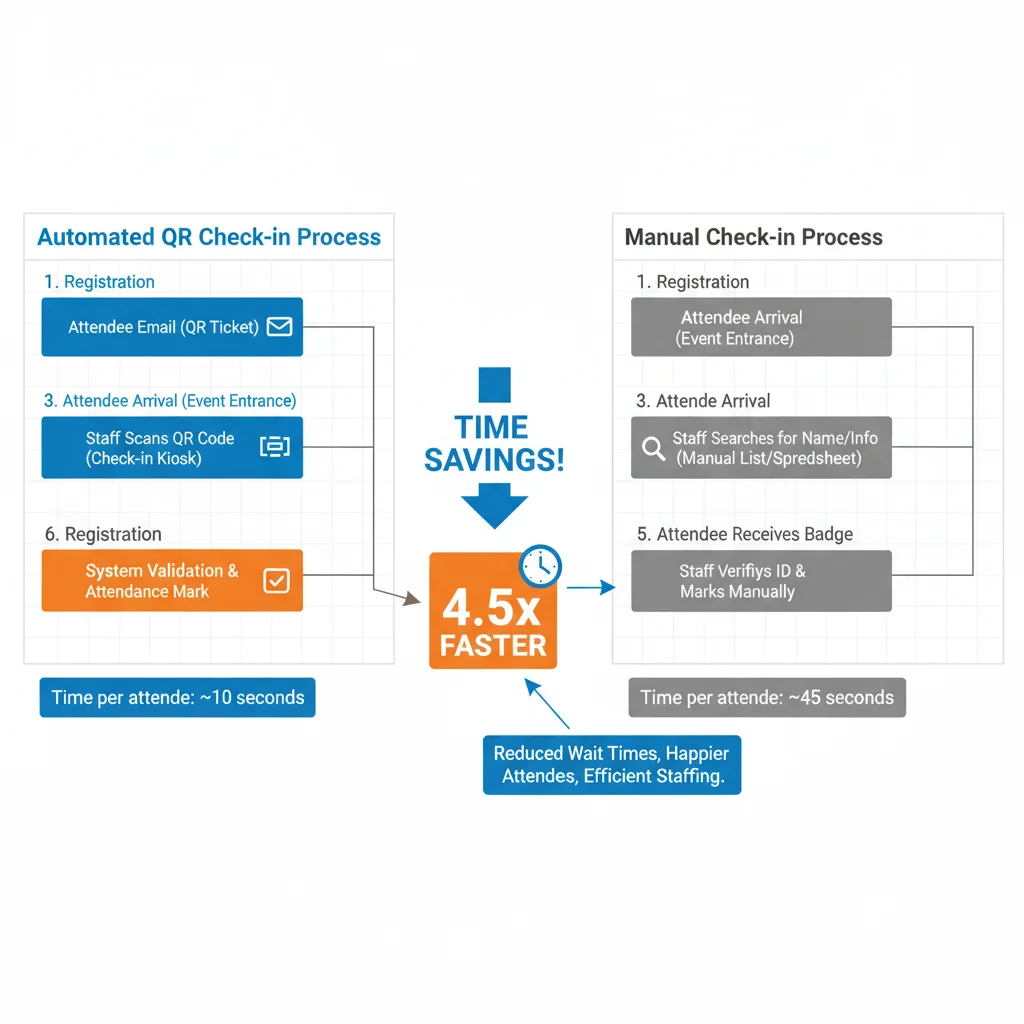
The Basic Flow
- Registration: Attendee signs up through your event platform
- Confirmation: System generates a unique QR code for that attendee
- Delivery: QR code is emailed or added to a mobile wallet
- Check-in: Attendee shows QR code, staff scans it
- Verification: System confirms ticket validity and logs attendance
What the QR Code Contains
Event QR codes typically encode a unique identifier that links to the attendee's registration record. The code itself doesn't contain personal information—it's just a reference number that your system looks up.
Choosing an Event Check-In Platform
All-In-One Event Platforms
Services like Eventbrite, Luma, Hopin, and Cvent handle registration, ticketing, and check-in. QR codes are generated automatically and the scanning app is included.
Best for: Most events. Simple setup, integrated data, professional appearance.
Dedicated Check-In Apps
Apps like zkipster, Bizzabo, or Whova specialise in on-site management. They often integrate with existing registration systems.
Best for: Large events with complex on-site needs, VIP management, or multiple session tracking.
Custom Solutions
Build your own system using QR code generation libraries and a simple database. Generate unique codes linked to attendee records.
Best for: Tech-savvy organisers with specific requirements not met by existing platforms.
Setting Up QR Code Check-In
Step 1: Configure Your Event Platform
Enable QR code tickets in your event settings. Most platforms do this by default, but check that confirmation emails include the QR code prominently.
Step 2: Test the System
Create test registrations and scan them before the event. Verify:
- QR codes scan correctly on different phones
- Attendee information displays properly
- Duplicate scan prevention works
- Offline mode functions (if available)
Step 3: Prepare Scanning Equipment
You can use:
- Smartphones/tablets: Most economical. Use the event platform's app or a third-party scanner.
- Dedicated scanners: Faster and more reliable for high-volume events. Connect to your check-in system.
- Self-service kiosks: Attendees scan their own codes. Reduces staffing needs.
Step 4: Design Your Check-In Area
Consider flow and bottlenecks:
- Multiple lanes for different ticket types
- Clear signage directing attendees
- Adequate space for queuing
- Separate area for problem resolution
- Good lighting for scanning
Step 5: Train Your Team
Staff should know how to:
- Operate the scanning app
- Handle scan failures
- Look up attendees manually
- Process on-site registrations
- Escalate problems appropriately
Communicating with Attendees
Clear Instructions in Confirmation Emails
Explain how check-in will work. Tell attendees to:
- Have their QR code ready (screenshot or email)
- Add to mobile wallet if supported
- Increase screen brightness for easy scanning
- Know their registration name if code fails
Reminder Before the Event
Send a reminder 24 hours before with the QR code attached again. Include venue directions and check-in location.
Signage On-Site
Clear signs help attendees navigate:
- "Have your QR code ready"
- Which queue for which ticket type
- Where to go for registration issues
Handling Common Issues
Lost or Forgotten QR Codes
Attendees will forget their codes. Be prepared:
- Manual lookup by email or name
- Ability to resend confirmation emails on-site
- Printed backup list as last resort
Scanning Failures
When codes won't scan:
- Clean the phone screen
- Increase screen brightness
- Try a different scanner
- Fall back to manual lookup
Network Issues
Venue WiFi may be unreliable. Prepare for offline scenarios:
- Use apps with offline scanning capability
- Download attendee lists before the event
- Have mobile data backup
- Print emergency lists
Advanced Uses
Session Tracking
Use QR codes to track attendance at individual sessions, workshops, or breakout rooms. Valuable for CPD/CEU credits and understanding attendee interests.
Networking Features
Some platforms let attendees scan each other's badges to exchange contact information. Eliminates business card collecting.
Gamification
QR codes at various locations (sponsor booths, sessions) can trigger points or prizes in event apps. Increases engagement across the venue.
Access Control
Different QR codes can grant different access levels. VIP areas, speaker lounges, or specific sessions can verify eligibility automatically.
Measuring Success
Track these metrics to improve future events:
- Check-in time: Average seconds per attendee
- Arrival patterns: When do people show up?
- No-show rate: Registrations vs actual attendance
- Session attendance: Which tracks are popular?
- Issue rate: How many needed manual lookup?
Get Started
Whether you're running a 50-person workshop or a 5,000-person conference, QR code check-in scales to your needs. Start with your event platform's built-in tools, test thoroughly, and prepare for the edge cases. Your attendees will appreciate the smooth start to their event experience.
Create Your QR Code Now
Free, fast, and no signup required. Start creating professional QR codes today.
Free QR Code Generator