
QR Code Size Guide: Minimum Sizes for Printing & Scanning
What size should your QR code be? Learn the minimum sizes for business cards, posters, billboards, and more. Includes a printable size chart.
One of the most common questions about QR codes is "what size should it be?" The answer depends on where you're placing your QR code and how far away users will be when scanning. Get the size wrong, and your QR code won't scan. Get it right, and you'll maximise engagement.
The Golden Rule: The 10:1 Ratio
The most important principle to remember is the 10:1 size-to-distance ratio. Your QR code should be at least 1/10th the distance from which it will be scanned.
For example:
- If someone scans from 30cm away, your QR code should be at least 3cm
- If someone scans from 1 metre away, your QR code should be at least 10cm
- If someone scans from 5 metres away, your QR code should be at least 50cm
Minimum QR Code Sizes by Use Case
Business Cards
Minimum size: 1.5 x 1.5 cm (0.6 x 0.6 inches)
Recommended size: 2 x 2 cm (0.8 x 0.8 inches)
Business cards are scanned at close range (15-30cm), so you can use smaller QR codes. However, going too small risks scanning issues, especially on older phones or in poor lighting.
Flyers and Brochures
Minimum size: 2 x 2 cm (0.8 x 0.8 inches)
Recommended size: 2.5 x 2.5 cm (1 x 1 inch)
Flyers are typically held at arm's length, making the standard 2cm minimum appropriate. Leave adequate white space (quiet zone) around the code.
Product Packaging
Minimum size: 1.5 x 1.5 cm (0.6 x 0.6 inches)
Recommended size: 2 x 2 cm (0.8 x 0.8 inches)
Package QR codes are scanned at close range while shopping. Keep the code away from folds, seams, and curved surfaces that could distort it.
Restaurant Table Tents and Menus
Minimum size: 3 x 3 cm (1.2 x 1.2 inches)
Recommended size: 4 x 4 cm (1.5 x 1.5 inches)
Diners scan from across the table (50-100cm). Larger codes also help in varied restaurant lighting conditions.
A4/Letter Size Posters
Minimum size: 2 x 2 cm (0.8 x 0.8 inches)
Recommended size: 3 x 3 cm (1.2 x 1.2 inches)
Small posters viewed close-up (30-60cm) can use modest QR code sizes while remaining easily scannable.
A3 and Larger Posters
Minimum size: 5 x 5 cm (2 x 2 inches)
Recommended size: 7 x 7 cm (2.8 x 2.8 inches)
Larger posters are viewed from 1-2 metres. Scale your QR code accordingly to ensure easy scanning.
Shop Windows and Signage
Minimum size: 10 x 10 cm (4 x 4 inches)
Recommended size: 15 x 15 cm (6 x 6 inches)
Pedestrians scan from 1-3 metres away. Factor in potential glass glare and angle of the sign.
Real Estate Yard Signs
Minimum size: 8 x 8 cm (3 x 3 inches)
Recommended size: 10 x 10 cm (4 x 4 inches)
People scan from the pavement or car, typically 2-5 metres away. Weather-resistant printing is essential.
Billboards and Large-Format Advertising
Minimum size: 90 x 90 cm (3 x 3 feet)
Recommended: Apply the 10:1 rule based on viewing distance
Billboard QR codes must be enormous to be scanned from 10+ metres. Consider whether a QR code is even the right choice for very large distances.
QR Code Size Chart
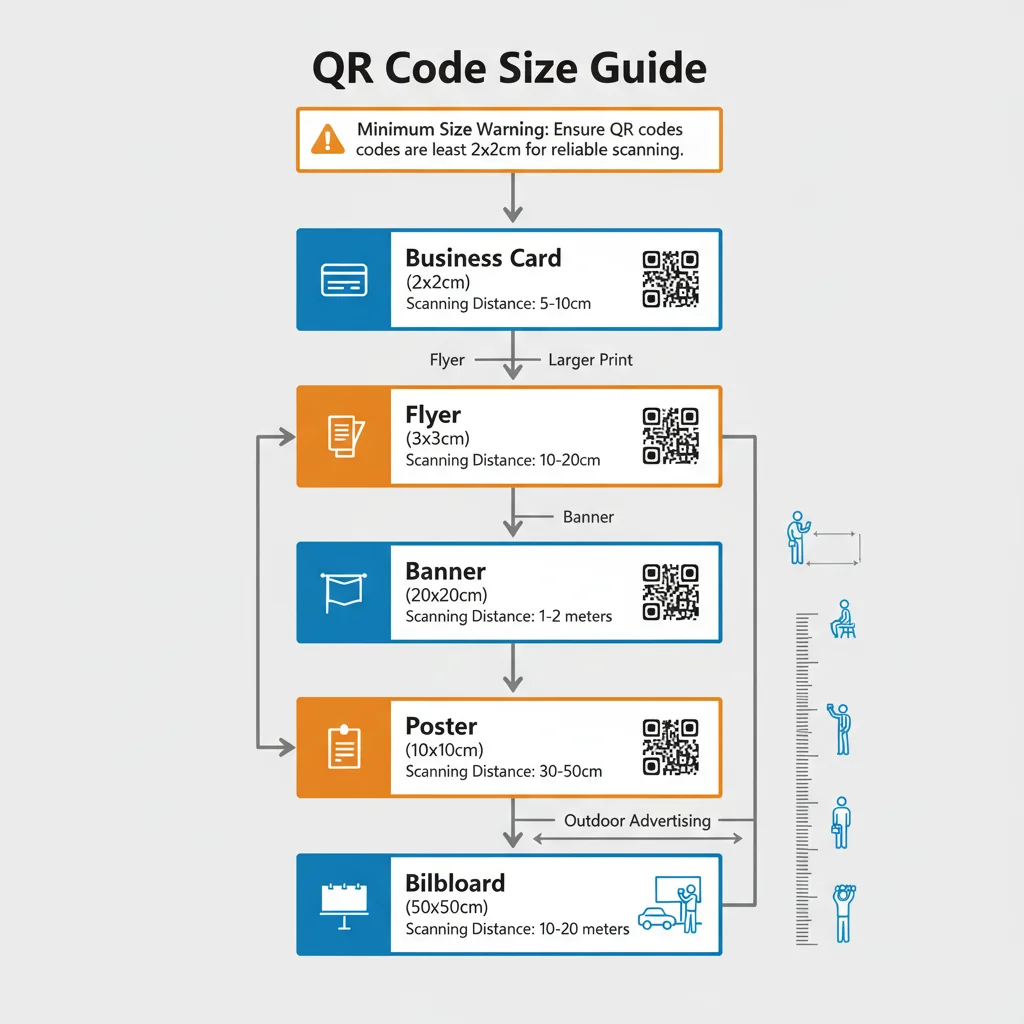
| Use Case | Scanning Distance | Minimum Size | Recommended Size |
|---|---|---|---|
| Business cards | 15-30cm | 1.5 x 1.5cm | 2 x 2cm |
| Flyers/brochures | 30-50cm | 2 x 2cm | 2.5 x 2.5cm |
| Product packaging | 15-40cm | 1.5 x 1.5cm | 2 x 2cm |
| Table tents | 50-100cm | 3 x 3cm | 4 x 4cm |
| A4 posters | 30-60cm | 2 x 2cm | 3 x 3cm |
| A3 posters | 100-200cm | 5 x 5cm | 7 x 7cm |
| Shop windows | 100-300cm | 10 x 10cm | 15 x 15cm |
| Yard signs | 200-500cm | 8 x 8cm | 10 x 10cm |
| Billboards | 10m+ | 90 x 90cm | Apply 10:1 rule |
Resolution and DPI Requirements
Size alone isn't enough—you also need adequate resolution:
- Print materials: Minimum 300 DPI (dots per inch)
- Large format printing: 150 DPI is often acceptable for billboards viewed from distance
- Digital screens: 72-150 PPI depending on display
Pro tip: Download your QR code as an SVG (vector format) for print. SVGs scale to any size without losing quality.
The Quiet Zone: Don't Forget the Border
Every QR code needs a quiet zone—a clear border around the code that helps scanners identify where it begins and ends. The quiet zone should be:
- Minimum: 4 modules wide (4 "squares" of the QR pattern)
- Recommended: Equal to 10-15% of the QR code's total width
When calculating your total space requirement, add the quiet zone to your QR code dimensions.
Factors That Affect Scanability
Data Density
QR codes containing more data have more modules (squares) packed into the same space. This makes them harder to scan at small sizes. Keep your URL short or use a dynamic QR code with a short redirect URL.
Error Correction Level
Higher error correction (L, M, Q, H) adds more data to the code, making it denser. If you're adding a logo or expecting some damage, use higher error correction—but you may need to increase the size.
Contrast
Poor contrast reduces scanability, effectively requiring a larger code. Stick with dark foreground on light background with at least 40% contrast difference.
Surface Material
Glossy surfaces can create glare, making codes harder to scan. Matte or semi-gloss finishes work best. Curved surfaces distort the code and require larger sizes.
Testing Your QR Code Size
Before committing to a print run:
- Print a test at the intended size
- Test scanning from the expected distance
- Try multiple phones (iPhone, various Android models)
- Test in different lighting conditions
- Have others test it—your familiarity might make you better at scanning than a typical user
When in Doubt, Go Bigger
The cost of a slightly larger QR code is minimal. The cost of an unscannable QR code is lost engagement and wasted printing. If you're uncertain, always round up to the next size category.
Ready to create your QR code? Our free generator lets you customize and download in any format, including high-resolution SVG for print materials.
Create Your QR Code Now
Free, fast, and no signup required. Start creating professional QR codes today.
Free QR Code Generator